Driving
Before you set off
Compare routes by time and distance and choose the one that suits you.
Along the way
Follow turns and see relevant road alerts as you travel.
Maps and navigation for Iraq
From the streets of your neighbourhood to the road out of town. See the next turn, find places nearby and say where you’re going in Iraqi Arabic.
See guidance in the appA sample from the app’s road network. Actual travel time varies.
On the road
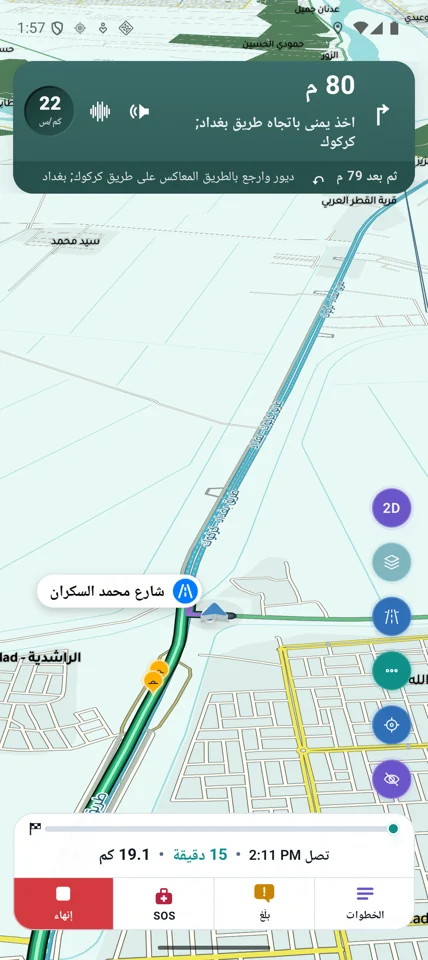
At this entrance to the Baghdad–Kirkuk road, Dahliz shows a right turn and the U-turn that follows 79 metres later. Rotate the map with two fingers to inspect the junction.
“This is your voice assistant. Where would you like to go?”
Inside Dahliz
Choose a use to explore the tools.
Compare routes by time and distance and choose the one that suits you.
Follow turns and see relevant road alerts as you travel.
Browse pharmacies, fuel stations and other places by distance.
Save a place or share its link with someone else.
Add friends by mutual request and choose when to make your presence visible.
Share messages and places with friends inside Dahliz.
Car-screen features depend on the app version and the compatible device.
Set your destination and confirm your position before setting off.
Send a request to nearby users when you need help.
Contact local emergency services directly. Community assistance is voluntary.
Common questions
The map, place directory and on-device routing are available on the phone. Traffic updates, messaging and some voice services need a connection.
Yes. Tap the microphone and say your destination in Iraqi Arabic. You can hear the assistant’s greeting on this page.
Navigation uses your location. Sharing it with friends is a separate setting you choose. See the privacy policy for details.
It lets you explore the map virtually and see cities from above inside the app.
The App Store and Google Play links take you to the listing. Availability depends on the store and testing programme.
Nearby users may respond voluntarily. In an emergency, contact the appropriate local service directly.
Support for Android Auto or CarPlay depends on the compatible device and app version. Set up your route and location permission while parked.
Open the Dahliz listing for your device. Downloads depend on the version or testing programme available to your account.